LinkSight
LinkSight is a desktop readout for the moment you plug into a strange port: what am I attached to, and where does it go?
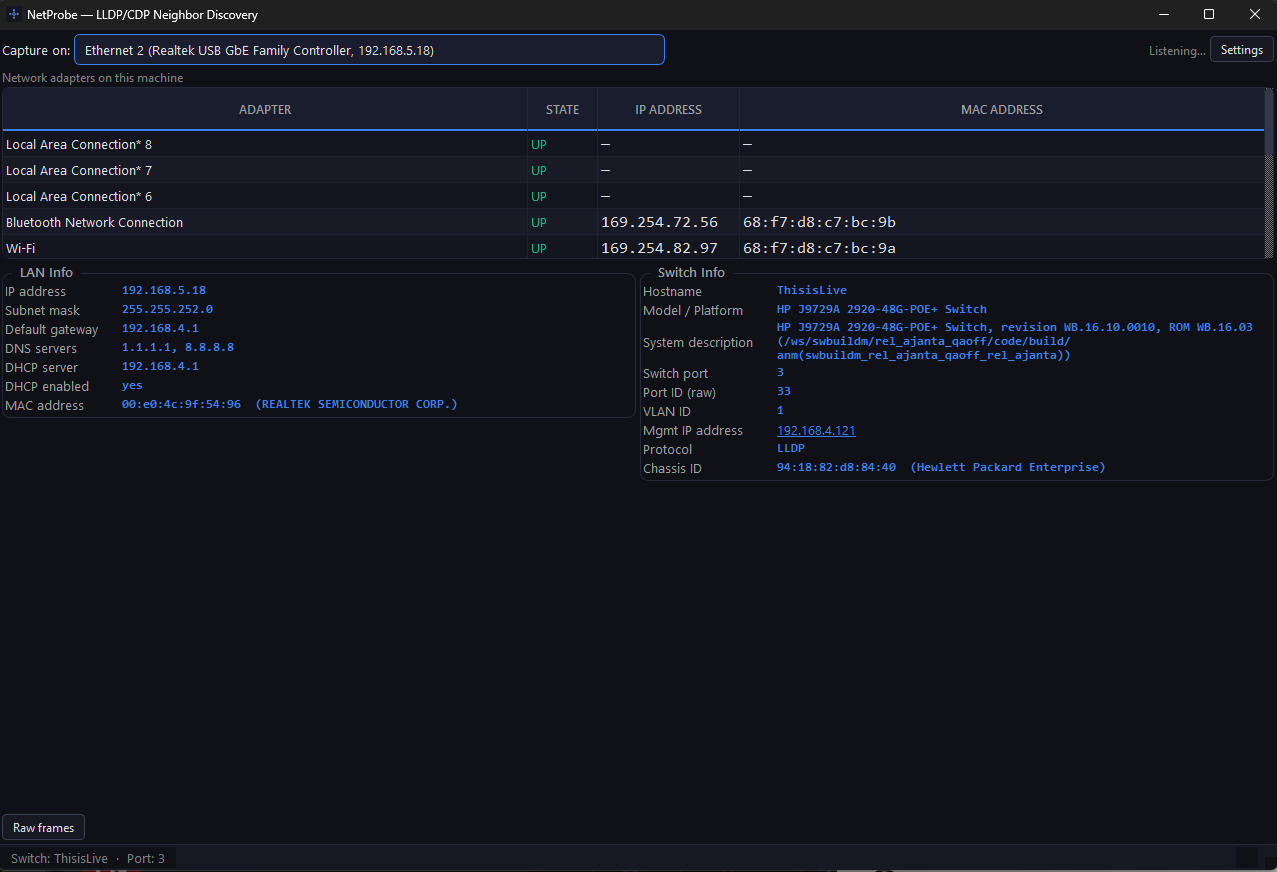
It listens passively on the wire for LLDP, CDP, and DHCP traffic and reports the neighbouring switch, the port ID and description, the VLAN, and the management addresses — all in memory, with no historical log and no active scanning.
Download
Section titled “Download”Windows, macOS, and Linux builds are attached to the latest release. No account, no email gate, no installer required.
LinkSight-mac.zipmacOS · application bundle · ~110 MB
Install
Section titled “Install”Windows
Section titled “Windows”- Download
LinkSight-windows.zip(orLinkSight-Portable.exefor a single file to copy to a jump host). - Install the Npcap driver from npcap.com if it is not already present. Packet capture does not work without it.
- Run
LinkSight.exeas Administrator. Raw capture requires elevation.
- Download
LinkSight-mac.zipand unzip it. - Move
LinkSight.appto Applications. - Grant packet capture access when prompted — BPF device access needs admin rights, and macOS may ask for terminal permission the first run.
From source (any platform)
Section titled “From source (any platform)”python -m venv .venvsource .venv/bin/activate # Windows: .venv\Scripts\activatepip install -r requirements.txtpython app.py # capture starts automaticallypython app.py --demo # replay simulated frames, no capture privileges neededOn Linux, capture needs CAP_NET_RAW — run via sudo, or grant the capability
to the binary.
What it reads
Section titled “What it reads”| Panel | Contents |
|---|---|
| NIC status | Local adapters with link status, IP, MAC, and hardware description |
| LAN info | IP, subnet mask, gateway, DNS servers, DHCP server and lease details |
| Switch info | Neighbouring device hostname, model, port ID, port description, VLAN ID, management IPs |
Management IPs are clickable: LinkSight prompts for a username and opens a
system terminal with ssh username@ip. Passwords are typed into the ssh prompt —
LinkSight never captures or stores credentials.
There is also a Raw frames toggle that expands a live hexdump of captured LLDP, CDP, and DHCP frames, so a result can be checked against Wireshark.
Upstream discovery
Section titled “Upstream discovery”Upstream discovery walks the physical switch chain from the port you are attached to, up to the edge — core switch, spanning-tree root, or the router or firewall that faces the WAN.
- Hop cards show the traced path ports — downlink to the previous hop, uplink to the next — with per-port diagnostics behind an expander: PVID, tagged and untagged VLAN semantics, allowed VLANs, spanning-tree state, link speed, and neighbour identity.
- The walk follows each switch’s spanning-tree root port, so it does not recurse into downstream IDF switches, and stops cleanly at the root bridge or the edge device.
- At the firewall it queries the interface table and the default route to identify the active WAN interface, its negotiated speed, operational status, and the upstream gateway.
- Where a switch does not expose spanning-tree MIBs (UniFi, for example), discovery falls back to LLDP neighbour direction. Where a neighbour advertises no management IP, LinkSight offers it as a candidate and resolves the address from its chassis MAC with an ARP sweep of the local subnet — or you can type the address yourself.
- If a switch in the chain does not answer, discovery stops there and presents the last reachable segment rather than failing outright.
Prerequisites: SNMP v2c read access on the managed switches. The read community is prompted once at the start of discovery and kept in RAM for the process lifetime — never written to disk, never sent anywhere.
Privacy
Section titled “Privacy”No historical logs, no background tracking, no active scanning, no telemetry, no account. Credentials and SNMP communities stay in memory. LinkSight reports what the wire already says.
Source
Section titled “Source”bryjogar/linksight — issues and pull requests welcome there. The README carries the full technical detail, including the build scripts and the release workflow.